This article explores how CPU starvation manifests in Oracle AWR reports. The discussion is divided into three parts:
- Why Doesn’t % DB Time Add Up to 100%?
- Don’t Be Fooled by CPU Utilization
- ASH to the Rescue
ASH to the Rescue
Theoretically, we can estimate CPU starvation by comparing two metrics:
- CPU time reported by Oracle
- CPU time reported by the operating system
Oracle’s instrumentation cannot distinguish between a process actively running on the CPU and one waiting in the CPU run queue. In contrast, the operating system’s CPU time excludes run queue wait time. The difference between these metrics approximates the time sessions spend waiting for CPU resources.
Deriving CPU Time from ASH
Oracle does not directly instrument DB CPU; it collects this data from the operating system. However, ASH provides a way to estimate Oracle’s perspective on CPU usage. ASH samples active sessions and labels those using or waiting for CPU as the “CPU + Wait for CPU” event. This name reflects Oracle’s inability to differentiate between actual CPU execution and run queue wait time. In the ASH report’s “Top Events” section, the average number of active sessions for the “CPU + Wait for CPU” event is reported per second. For example:

Here, the value is 61.38, meaning an average of 61.38 sessions are either executing on or waiting for CPU at any given second.
Obtaining CPU Time from the Operating System
The AWR report’s “Load Profile” section provides the “DB CPU” metric, which indicates the average CPU seconds consumed by Oracle sessions per second, as reported by the operating system. For example:
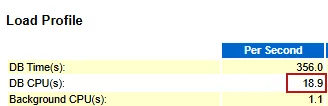
In this case, the “DB CPU” value is 18.9, meaning Oracle sessions use 18.9 CPU seconds per second across multiple cores.
Interpreting the Difference
The gap between these metrics reveals CPU starvation:
Sessions in CPU Run Queue=ASH Sessions (CPU + Wait for CPU)−DB CPU
Sessions in CPU Run Queue=61.38−18.9=42.48
This can be interpreted that, on average, for every second, 61.38 Oracle sessions are contending for CPU resources, but only 18.9 sessions can execute on the CPU. The remaining 42.48 sessions are stuck in the CPU run queue, highlighting significant CPU starvation.


 Yuan Yao, An Oracle ACE's Blog
Leave a comment