In Oracle database environments, CPU-noisy neighbors are non-Oracle processes that consume significant CPU resources on a server, potentially degrading Oracle database performance. By comparing Oracle’s CPU usage with the host’s overall CPU consumption, you can identify these interfering processes. Below are three methods to detect CPU-noisy neighbors in Oracle database environments.
Method 1: Compare Calculated Oracle CPU Usage with Host “User CPU”
You can estimate Oracle’s CPU usage by multiplying “%Total CPU” (percentage of host CPU used by the Oracle instance) by “%Busy CPU” (how busy Oracle processes are when allocated CPU time) from the Instance CPU section. For a dedicated Oracle server, this should approximate the “User CPU” in the Host CPU section. A significant discrepancy suggests the presence of other active processes consuming CPU resources.
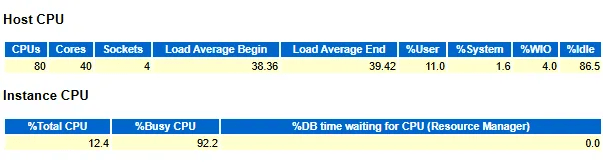
In this example, Oracle’s estimated CPU usage: 12.4% × 92.2% = 11.4%, closely matching the host’s “User CPU” (11.0%). This indicates the server primarily runs Oracle workloads.
Method 2: Compare “Total CPU Time” with “BUSY_TIME”
Compare “Total CPU Time” (from Oracle’s Time Model Statistics, in seconds) with “BUSY_TIME” (from Operating System Statistics, in hundredths of a second).
Example:

In this example: Total CPU Time (17,562.40 s) is close to BUSY_TIME (19,057.13 s), indicating minimal interference from non-Oracle processes.
Method 3: Compare “CPU Used by This Session” with “USER_TIME”
Compare “CPU Used by This Session” (from Instance Activity Stats, in hundredths of a second) with “USER_TIME” (from Operating System Statistics, in hundredths of a second).
Example:

In this example, the values are close (1,492,328 vs. 1,560,943 cs), confirming that Oracle dominates CPU usage, with negligible contributions from other processes.


 Yuan Yao, An Oracle ACE's Blog
Leave a comment