Oracle ASH raw data not only holds various session activities but also records the timestamp of these activities. By aggregating activities based on timestamp granularity (such as hours or minutes), we can create timelines of any activity. These timelines give valuable insights about pattern and trend of these activities.
The following SQL query analyzes session activity for the previous day. It groups data by hour and categorizes each sample by wait class, offering a high-level view of the database’s operational behavior:
-- This query categorizes activities of active sessions by wait class,
-- and groups them by hour for the entire last day.
-- Dated: May 2025
-- Author: Yao Yuan

SET LINESIZE 200;
SET PAGESIZE 100;

SELECT
    TO_CHAR(TRUNC(sample_time, 'HH'), 'HH24') AS sample_hour,
    COUNT(*) AS sum_activity,
    SUM(DECODE(wait_class, NULL, 1, 0)) AS CPU,
    SUM(DECODE(wait_class, 'User I/O', 1, 0)) AS user_io,
    SUM(DECODE(wait_class, 'System I/O', 1, 0)) AS system_io,
    SUM(DECODE(wait_class, 'Commit', 1, 0)) AS commit,
    SUM(DECODE(wait_class, 'Network', 1, 0)) AS network,
    SUM(DECODE(wait_class, 'Concurrency', 1, 0)) AS concurrency,
    SUM(DECODE(wait_class, 'Application', 1, 0)) AS application,
    SUM(DECODE(wait_class, 'Configuration', 1, 0)) AS configuration,
    SUM(DECODE(wait_class, 'Administrative', 1, 0)) AS administrative,
    SUM(DECODE(wait_class, 'Other', 1, 0)) AS other,
    SUM(DECODE(wait_class, 'Idle', 1, 0)) AS idle
FROM
    dba_hist_active_sess_history
WHERE
    sample_time BETWEEN TRUNC(SYSDATE - 1) AND TRUNC(SYSDATE)
GROUP BY
    TRUNC(sample_time, 'HH')
ORDER BY 1;
Below is an example output from a hospital production database:
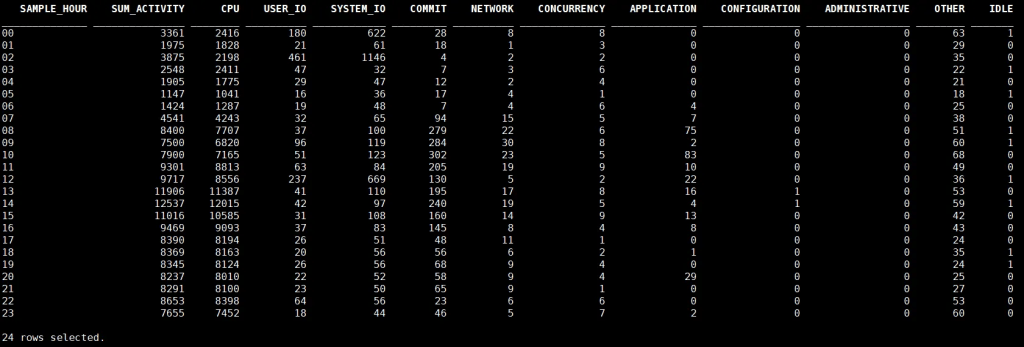
The workload is clearly CPU-intensive, with peak activity during typical clinical hours (12:00–15:00). Activity during the night remains low, except for a distinct System I/O surge at 02:00, likely due to scheduled batch operations such as backups or ETL jobs.
You can easily adapt the SQL query to fit your specific analysis needs. For example, add filters by program, module, user, or SQL_ID, or adjust the time granularity from hours to minutes or days depending on the level of detail you require.


 Yuan Yao, An Oracle ACE's Blog
Leave a comment