A common assumption in Oracle database administration is that incremental backups are inherently lighter than full backups because they process only changed blocks. A recent real-world case, however, revealed a counterintuitive result: incremental backups caused severe frontend performance degradation, while full backups completed without noticeable business impact.
To investigate this behavior, we generated a compare period ADDM report to perform a comparative analysis between two time windows: a baseline window during a full backup and a comparison window during an incremental backup.
We generated the ADDM comparison report using the following script:
SET LONG 1000000 LONGCHUNKSIZE 1000000 LINESIZE 200 PAGESIZE 0 TRIM ON TRIMSPOOL ON
SPOOL addm_compare_db_report.html

SELECT DBMS_ADDM.compare_databases(
   base_dbid          => '2788912098',
   base_begin_snap_id => 50640,
   base_end_snap_id   => 50641,
   comp_dbid          => '2788912098',
   comp_begin_snap_id => 50696,
   comp_end_snap_id   => 50697,
   report_type        => 'HTML') AS report
FROM dual;

SPOOL OFF;
The resulting HTML report is very informative, consisting of two major sections: overview and details.
Overview Section
The Overview section:
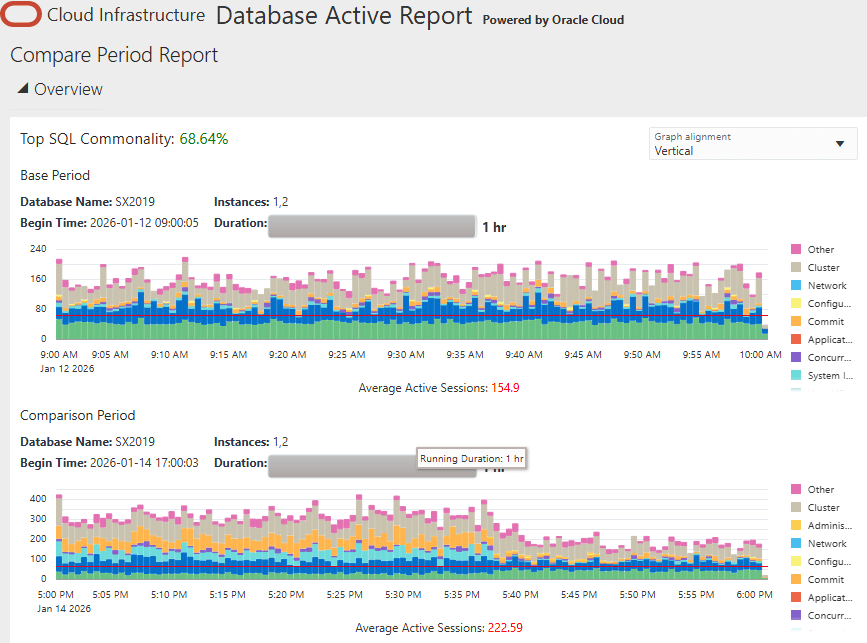
Key findings from the Overview section include:
- The Top SQL Commonality was 68.64%, indicating that the core business workload remained largely unchanged between the two periods.
- System load during the incremental backup window increased significantly, reaching 222.59 compared to 154.9 during the full backup window.
- Despite the higher system load, CPU activity was lower during the incremental backup period, suggesting that the CPU was frequently stalled while waiting on other resources.
- System I/O and Commit activity increased noticeably during the incremental backup window.
Tentative conclusion: the database was not doing more work; it was spending more time waiting.
Details Section
Moving on to the Details section, the I/O subsection is of interest to us.
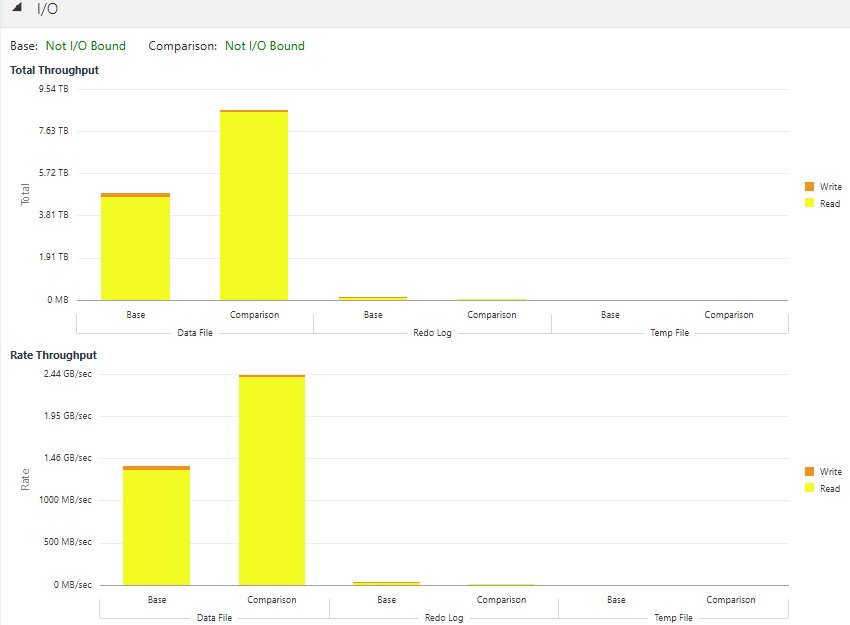
During the incremental backup window, I/O throughput reached 2.44 GB/sec, approximately 1 GB/sec higher than the throughput observed during the full backup baseline. In both periods, read operations dominated the workload, while write activity remained minimal.
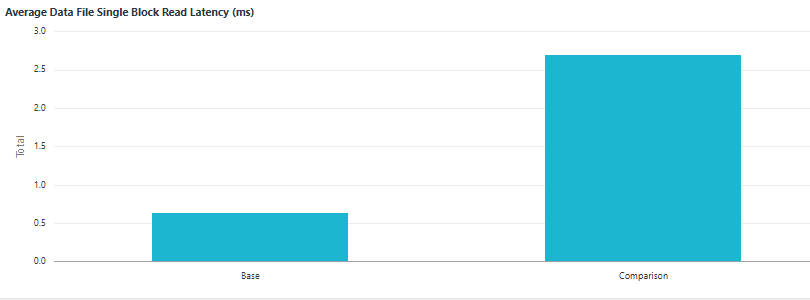
More importantly, storage latency increased dramatically. The average data file single-block read latency, a key indicator of storage responsiveness, was measured at 0.6 milliseconds during the full backup window. During the incremental backup window, this latency surged to 2.7 milliseconds, more than a fourfold increase.
Root Cause and Resolution
The collected evidence clearly indicates I/O saturation during the incremental backup window, a condition not observed during the full backup period.
In this environment, a third-party backup solution was used, transmitting data to an external backup server through tape channels rather than writing to local disks. During a full backup, data was streamed sequentially to the external server, allowing intermittent idle periods on the local disks. In contrast, incremental backups required high-density block scanning across data files to identify changed blocks. This produced a sustained and unrelenting read workload that saturated the I/O subsystem and significantly increased latency.
This I/O saturation triggered a chain reaction:
- Heavy read activity increased system I/O activity and prolonged I/O latency.
- Elevated I/O latency delayed data delivery to the CPU, reducing CPU activity.
- The same latency slowed redo log writes, increasing Commit times for business transactions.
- Together, these effects degraded database response times and led to frontend user complaints.
The solution was straightforward: apply throttling to the incremental backup job. By limiting its I/O rate to below 1.4 GB/sec, roughly the level observed during successful full backups, the system was able to complete incremental backups without impacting business performance.


 Yuan Yao, An Oracle ACE's Blog
Leave a comment