This is Part 3 of a 3-part article series to explore CPU Hyper-Threading.
- What Is CPU Hyper-Threading?
- How Hyper-Threading Skews CPU Usage Readings
- Does Hyper-Threading Boost CPU Performance—and by How Much?
Does Hyper-Threading Boost CPU Performance—and by How Much?
Multiple-thread applications—such as video editing, 3D rendering, virtualization, and some scientific computing tasks—benefit the most from Hyper-Threading (HT). For instance, on the aforementioned server, with HT disabled, it can only handle 40 threads simultaneously. When HT is enabled, its capacity doubles to 80 threads.
However, transforming a physical core into two logical CPUs does not double the core’s performance. To illustrate this, I’ll present a simple benchmark experiment to measure the performance gains of HT.
Before running the benchmarks, I examined the CPU details for processors 1, 41 and 42 using the following command:
oracle@Yuan ~$   cat /proc/cpuinfo | grep -A 20 "processor\\s*:\\s*1$"
processor	: 1
vendor_id	: GenuineIntel
cpu family	: 6
model		: 62
model name	: Intel(R) Xeon(R) CPU E5-4650 v2 @ 2.40GHz
stepping	: 4
microcode	: 0x42e
cpu MHz		: 2731.311
cache size	: 25600 KB
physical id	: 1
siblings	: 20
core id		: 0
cpu cores	: 10
... removed for simplicity

oracle@Yuan ~$   cat /proc/cpuinfo | grep -A 20 "processor\\s*:\\s*41$"
processor	: 41
vendor_id	: GenuineIntel
cpu family	: 6
model		: 62
model name	: Intel(R) Xeon(R) CPU E5-4650 v2 @ 2.40GHz
stepping	: 4
microcode	: 0x42e
cpu MHz		: 2703.647
cache size	: 25600 KB
physical id	: 1
siblings	: 20
core id		: 0
cpu cores	: 10
... removed for simplicity

oracle@Yuan ~$   cat /proc/cpuinfo | grep -A 20 "processor\\s*:\\s*42"
processor	: 42
vendor_id	: GenuineIntel
cpu family	: 6
model		: 62
model name	: Intel(R) Xeon(R) CPU E5-4650 v2 @ 2.40GHz
stepping	: 4
microcode	: 0x42e
cpu MHz		: 2217.829
cache size	: 25600 KB
physical id	: 2
siblings	: 20
core id		: 0
cpu cores	: 10
... removed for simplicity
We can see that the processor 1 and 41 reside on the same physical core (Physical ID 1, Core ID 0), while processor 42 is on a different core (Physical ID 2, Core ID 0).
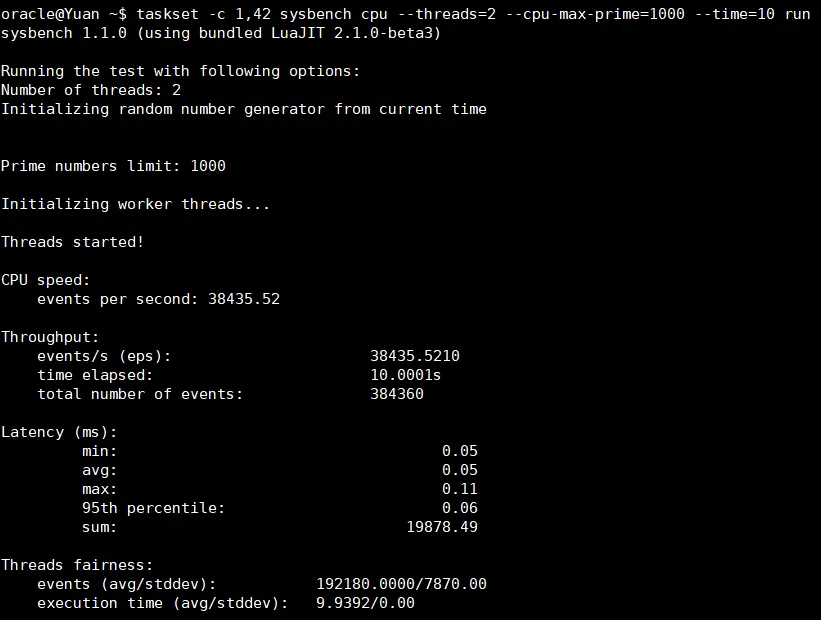
I used sysbench to test CPU performance with a prime number calculation task (–cpu-max-prime=1000) over 10 seconds, running two threads in each test.
Test 1: Threads on Different Cores (Processors 1 and 42)
Test 2: Threads on the Same Core (Processors 1 and 41, with HT)

In Test 1, running two threads on separate physical cores yielded a higher throughput of 38,435.52 EPS with an average latency of 0.05 ms. In Test 2, running two threads on the same physical core (via HT) resulted in a reduced throughput of 32,502.69 EPS—a 15.4% drop—and a slightly higher latency of 0.06 ms.
These results demonstrate that while HT improves scheduling and utilization of idle execution units, allowing more threads to run concurrently, it does not double the performance of a physical core. The performance gain is significant but limited by the shared resources within a single core.


 Yuan Yao, An Oracle ACE's Blog
Leave a reply to CPU Hyper-Threading Explained: What It Is (Part 1 of 3) – Yuan Yao, An Oracle ACE’s Blog Cancel reply